
Telegram account hacked: what to do next
Jump to a section
If Telegram still opens on one of your devices
Open Telegram on the device where you are still signed in. That sign-in is the strongest tool you have, so do not sign out, delete the app or reinstall. The official FAQ sends a reader who still has access to two-step verification and the active sessions list.
Step 1. Open the device list
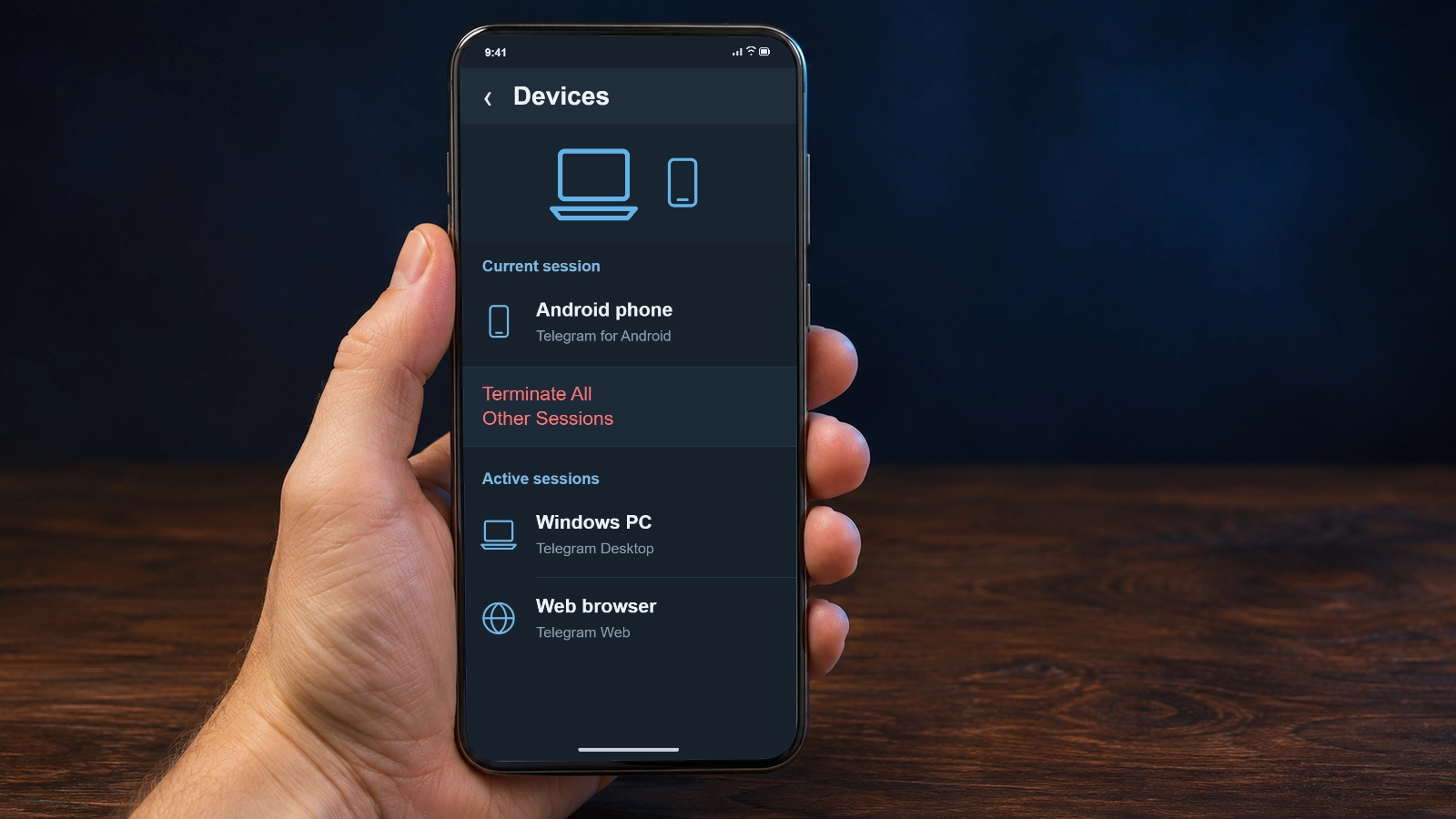
In the mobile app, open Settings and tap Devices. In Telegram Desktop, look under Settings, Privacy and Security, Active sessions. Each row shows the app, the last active time and a location derived from the IP address.
What you should see: Every signed-in device is visible, including the one in your hand.
Step 2. Compare the rows with hardware you own
Read the app name and the last active time before the city. An old phone, a browser tab left open or a VPN can explain a row. A foreign city alone does not prove a break-in.
What you should see: You have a short list of rows you cannot match to a device you use.
Step 3. Remove the row you cannot explain
Terminate All Other Sessions also ends your own laptop, tablet and second phone. It keeps the sign-in you are using and closes every other one.
If this sign-in started less than 24 hours ago, Telegram can refuse to end the others. The age counts from this sign-in, not from the break-in; the next section explains why.
Open the row that does not belong to you and choose Terminate Session. Use Terminate All Other Sessions only if you accept that your own other devices will be signed out too.
Editorial reconstruction of the English Active sessions screen, not a screenshot of a specific build. Device names are examples, and one extra session alone does not prove a break-in: compare it with hardware you use. The dialog ends one selected session, not the account. What you should see: The selected row disappears and the device in your hand stays signed in.
When Telegram refuses to end the other sessions
The refusal has a specific cause. Telegram documents a limit for a current login younger than 24 hours: that login cannot end the rest, and the app may call it too new. The age counts from this sign-in, not from the moment you noticed the intruder.
An older trusted session on another device is not under the same limit, so it may end the foreign one. Do not create a new login to test this, because a fresh session starts the same 24 hours again.
Locked out: pick the route that matches what you control
No open login changes the job. The way back depends on the phone number and the 2FA password. Work out which you can still pass.
No Telegram session is open. What can you still use?
The number is yours and you know the 2FA password.
Install Telegram on a device you control, enter the number with its country code and request the code. It may arrive by SMS, in the app or another way; SMS is not guaranteed. Pass it, then the password.
You are back in the same account. Check which chats and contacts remain; signing in does not restore deleted data or transfer Secret Chats to a new device.
The number is yours, but the 2FA password is forgotten.
Pass the login code first. On the password screen choose Forgot password. A reset reaches a recovery email only if one was bound beforehand; an address used for login codes is a different setting. Without that email, the remaining official routes are the support form or deleting the account; deletion ends the account, it does not recover it.
You know whether a recovery email exists before you invest more time.
The number is lost, reassigned, or already changed inside Telegram.
Ask your mobile operator to block and reissue the number. That fixes the phone line, not the Telegram login: if the account’s number was changed, a new SIM with the old number is not enough by itself. Then use the official support form with your name, an email address and the number.
A passkey created earlier may appear as a login method where the client supports it. It can replace an SMS code but not a 2FA password, and an existing key is not guaranteed to be offered.
If a session is still open and the 2FA password is forgotten, reset it there. Telegram documents a seven-day server-side wait that can be cancelled. The timer is a condition, not a promise that access returns on day seven.
The support form has no published response time and no recovery rate, and paid recovery offers sit outside the official procedure. Write what happened in a few sentences, and never include a login code, 2FA password, recovery codes or session files.
If requests for money or codes are coming from your account
While someone else is signed in, they can write to your contacts. Warn people through a channel that does not go through Telegram: a call, another messenger, email. Do it before you open settings.
A message you can adapt: “My Telegram account was used today without my permission. Please ignore any request for money or codes from it until I confirm otherwise on another channel.”
Never pass a login code to anyone, including a contact who says the app asked for it. A request shows that someone wants the code; it does not prove a break-in, and it never makes sharing safe.
The same caution covers QR codes. Confirming a login in an open Telegram authorizes another device, so approve only a login you started. A QR code alone does nothing; the confirmation grants access.
After you are back in
Recovery is not finished when the app opens. A session, a passkey or a changed detail may be left behind.
- Open Devices again and terminate every row you cannot match to your hardware.
- Set a new two-step verification password. It protects future logins; it does not end sessions, which is why the list comes first.
- Confirm the recovery email is one you still control, and keep it separate from the address used for login codes.
- Review login keys and passkeys, delete those you did not create, and remove a passkey only if you can still sign in without it.
- Tell your contacts the account is yours again, through the same other channel.
When the signs point somewhere else
Not every strange event is a takeover. A session in another city can follow a VPN, a mobile network or a device you forgot; a login code can arrive because someone typed your number by mistake. Neither proves a compromise, and neither should be ignored if the session list looks wrong.
A frozen or limited account is a different state. If messages refuse to send but the session list is normal, the appeal procedure for a restriction does not remove foreign sessions. The two problems can coexist. The frozen account guide covers the notice and its appeal date; if a new device will not receive a login code, the new phone login guide follows that step.
Ordinary login errors look similar: a code that never arrives, a password prompt on a trusted device. Check the exact message first.
Common questions
Someone else is using my Telegram account. Can I get it back?
A session you still control is the best start. If you can complete the login step and know the 2FA password, a recovery email is not needed for that login. If you have no usable login or recovery route, you can explain the situation through the support form, but it does not promise recovery. In the forgotten-password flow described here, deletion still requires a successful login code first and does not restore the old account.
Why can’t I end the other sessions?
A current session younger than 24 hours cannot end the rest; the age counts from that session’s login. An older trusted session on another device may still do it. Waiting does not remove the foreign session by itself.
Does changing my 2FA password log the other person out?
No. A new password protects future logins, while ending sessions is a separate action in the Devices list. Do both.
Should I delete the account to stop the person using it?
Only if you accept that the account is gone. Deletion is irreversible, the chats do not come back, and a new registration starts empty. It is not a recovery step, and it may take effect later.
I paid a service that promised to recover my account. What now?
No official source confirms a paid recovery route or a guaranteed result. Stop sharing codes, passwords and session files, and change what you still can from a session you control.
Official sources
- Telegram FAQ: two-step verification and login protectiontelegram.org/faq
- Telegram API: ending one sessioncore.telegram.org/method/account.resetAuthorization
- Telegram API: ending all other sessionscore.telegram.org/method/auth.resetAuthorizations
- Telegram API: password and email recoverycore.telegram.org/api/srp
- Telegram API: account deletioncore.telegram.org/api/account-deletion
- Telegram API: passkeyscore.telegram.org/api/passkeys
- Telegram support formtelegram.org/support