
How to delete your Telegram account permanently
Jump to a section
What to save before you delete anything
Go through Saved Messages and any chats that hold documents and photos you still need, and download those files to your computer. A link to a message inside Telegram is not a copy; once the account is gone, the link stops working for you.
For a full history, use the export tool in Telegram Desktop. It lives under Settings, then Advanced, then Export Telegram Data. If you only need one conversation, open its menu and choose Export chat history instead. The export can include photos and videos, and it comes out as HTML you can read in a browser or as JSON for scripts.
Open the exported folder before you delete anything and check that the dates and attachments you care about are inside. What the archive contains depends on the options you picked during export. The copy lets you read your old messages later, but it cannot put them back into a Telegram account.
If you run a channel or a group, decide who takes over before you leave. Transfer owner rights through the community settings and confirm the change took effect, because adding an admin and transferring ownership are different levels of access.
A Premium subscription paid through the App Store or Google Play keeps charging until you cancel it in that store. Deleting the account does not stop those charges. Payments through Telegram’s own PremiumBot do stop once the account is gone.
The official deactivation page, step by step
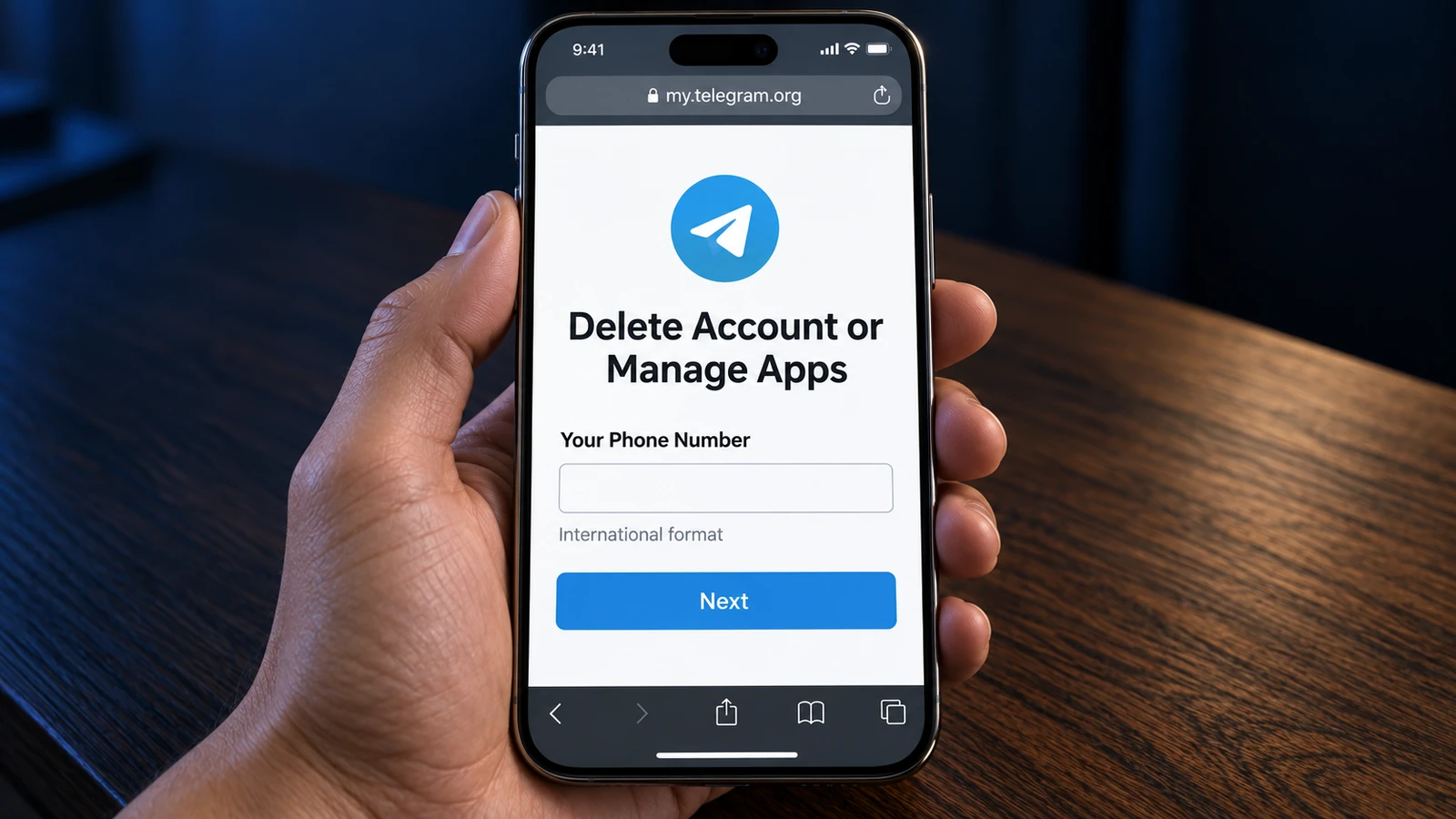
Telegram keeps manual deletion on a separate site, my.telegram.org. The short address telegram.org/deactivate redirects to the same place. Both lead to a page titled Delete Account or Manage Apps, and neither deletes anything until you confirm later in the flow.
- Check the account inside the app. Open Telegram’s settings and read the number back. If you use several accounts, make sure the right one is active.
- Enter your number on the site. In the Your Phone Number field, type it in international format with the plus and country code, then press Next.
- Read the message Telegram sends. The confirmation code arrives inside Telegram, in the service chat, not by SMS. Look at a device where this account is already signed in.
- Sign in. Paste the code into the Confirmation code field and press Sign In. Only ever enter this code on the official site.
- Open the deletion step. If the site shows a management menu after login, pick Delete account, read the warning, double-check the number, and finish the confirmation.
This path deletes the account on the spot, with no waiting period. If the site tells you to wait or shows a limit, follow what the screen says rather than sending repeat requests.
Stay signed in on at least one device. Until the deletion finishes, keep Telegram open somewhere you can read the code. If you log out everywhere first, the message with the code has nowhere to arrive.
Deleting from an Android phone
Use the browser on the phone and follow the steps above, switching to the app when the code arrives. In the regular Telegram app for Android, the only account-deletion setting you will find in the menu is the inactivity timer, which schedules deletion for later instead of doing it now.
If the form feels cramped on a small screen, or the page misbehaves, open the same address on a computer and read the code from the phone. Telegram itself recommends doing this from a desktop browser.
Deleting from an iPhone
Telegram for iOS keeps a direct route in the app. Open Settings, go to Privacy, and find the “If away for” setting. Underneath it sits the option to delete the account now. Read both warnings and complete the confirmation.
The exact wording shifts between app versions and languages. If the item is missing on your build, use the deletion page in Safari instead. Do not pick the one-month term if your goal is to delete the account manually today.
What deletion actually removes, and what it leaves
Deleting closes the account and clears the data Telegram held for it in the cloud: your message history from your side, along with your contacts and profile. The decision cannot be reversed, and signing up again on the same number creates a brand-new account with an empty history.
The people you talked to can still have the messages you sent, including files and screenshots they saved. To clear one private conversation on both sides, delete it from inside the chat before you remove the account, and read the confirmation dialog carefully.
Groups and channels you created are not shut down automatically. Admins keep their rights and members keep talking. If a community needs to close, close it before deleting the account.
In an old chat, the other person may see Deleted Account where your name used to be. That conversation does not reconnect to a new account you register later, even on the same number. Telegram also warns that the number may not be available for re-registration for a few days after deletion.
The other way out: 18 months of silence
Telegram also deletes accounts that stop logging in. The default period is 18 months, and you can change it in the privacy settings under the same “If away for” heading. This is a timer that resets whenever you use Telegram, on any device, not a countdown from the day you picked the setting.
Use the inactivity timer if you want a dormant account to disappear on its own schedule. Use the deletion page if you want it gone today.
Official Telegram documentation. Checked September 13, 2026. The illustrations show simplified Telegram interfaces.
Common questions
Does deleting the Telegram app delete my account?
No. Removing the app only removes it from the device. The account keeps existing until you delete it on the deletion page or let the inactivity period run out.
The code never arrives. Can I get it by SMS instead?
The deletion page sends its code through Telegram, not SMS, so an SMS will not come. Check the service chat on a device where the account is signed in, and make sure the number on the site matches the account. If the site reports too many attempts, stop and try again after the wait it names.
Can I delete the account without access to Telegram?
Not with the number alone. The page requires the code from inside Telegram, so you need at least one signed-in device. If you have lost every session, you first need to recover access to the account itself; deleting it comes after that.
Can a deleted account be recovered?
No. Telegram states that termination is irreversible. Registering the same number again starts a new account, and the old history does not reappear in it.
Can I sign up again on the same number right away?
Sometimes not immediately. Telegram warns that the number may stay unavailable for re-registration for a few days, so do not delete an account as a quick “reset” if you need it today.
I want a break, not a deletion. Is there a pause button?
Telegram has no temporary deactivation: the account either exists or it does not. Logging out leaves it intact, and a short inactivity period makes it disappear on its own if you do not come back. Deleting the app achieves neither; the account stays as it is.
Sources
- Deletion sign-in pagemy.telegram.org/auth?to=delete
- Short redirect addresstelegram.org/deactivate
- Consequences of deleting and re-registeringtelegram.org/faq
- Data deletion and the inactivity periodtelegram.org/privacy
- Chat export in Telegram Desktoptelegram.org/blog
- Premium subscriptions after account deletiontelegram.org/faq_premium
- Telegram's note on re-registration after deletionbugs.telegram.org