
Is Telegram Premium worth it? Features and limits explained
Telegram Premium adds larger file uploads, voice transcripts, whole-chat translation and tools for organizing work. It is useful when those tasks are part of your everyday messaging. Emoji statuses and Stories controls can also justify the price if you enjoy using them.
Choose the account before choosing the plan. A subscription on your current account serves the conversations already there. For a new project account, DragonSIM offers separate Telegram accounts with Premium made to order. That service creates a new account; it does not activate Premium on your existing one.
Jump to a section
- Telegram Premium features compared with the free app
- Four useful reasons to consider a subscription
- Large files: separate the sender’s limit from the recipient’s
- Make a busy account easier to navigate
- Turn voice notes into text and translate an ongoing chat
- Tools for shared work and longer posts
- Stories, profile styles and privacy settings
- How much is Telegram Premium? Check the offer for your account
- What changes when Premium ends
- An existing subscription, a gift or a separate account
- Common questions
Telegram Premium features compared with the free app
| Feature | Free account | Premium account |
|---|---|---|
| File upload | Free accountUp to 2 GB per file | Premium accountUp to 4 GB per file |
| Chat folders | Free accountUp to 10 | Premium accountUp to 20 |
| Pinned chats in the main list | Free accountUp to 5 | Premium accountUp to 10 |
| Channels you can join | Free accountUp to 500 | Premium accountUp to 1,000 |
| Accounts in an app | Free accountUp to 3 | Premium accountA fourth account slot |
| Voice and video transcripts | Free accountLimited free allowance | Premium accountNo free-tier request quota |
| Message translation | Free accountIndividual messages | Premium accountEntire chats, groups and channels |
| Saved Messages | Free accountStore messages and files | Premium accountAlso filter saved material with tags |
If your busiest account needs twelve folders, the higher limit is relevant. The fourth account slot has a different purpose: it adds room for another account in the app, while subscriptions remain separate.
Before buying for one particular feature, check that the official client on your main device supports it. Support for newer features differs between apps and versions.
Four useful reasons to consider a subscription
Your deliverables exceed 2 GB
Send a larger file directly
- Uploads can reach 4 GB per file.
- Clients can download them with free accounts.
Voice notes and foreign-language chats fill your day
Read and translate the conversation
- Transcripts and whole-chat translation reduce repeated actions.
- Check important names and figures against the original.
You coordinate work inside Telegram
Organize chats and shared tasks
- Folders, saved tags and checklists help you find the next item.
- Start with the tool that addresses your current problem.
You publish Stories or enjoy customization
Choose the extras you want
- Story controls and profile styling have personal value.
- Compare that value with the price you will pay.
Review a few recent conversations: find an attachment you could not send, a voice note you postponed or a reference you struggled to retrieve. Choose one of these tasks as your starting point.
During the first paid period, notice whether you use the chosen tool regularly. For a short project, record the renewal date when you subscribe so the paid period matches the work you have planned.
Large files: separate the sender’s limit from the recipient’s
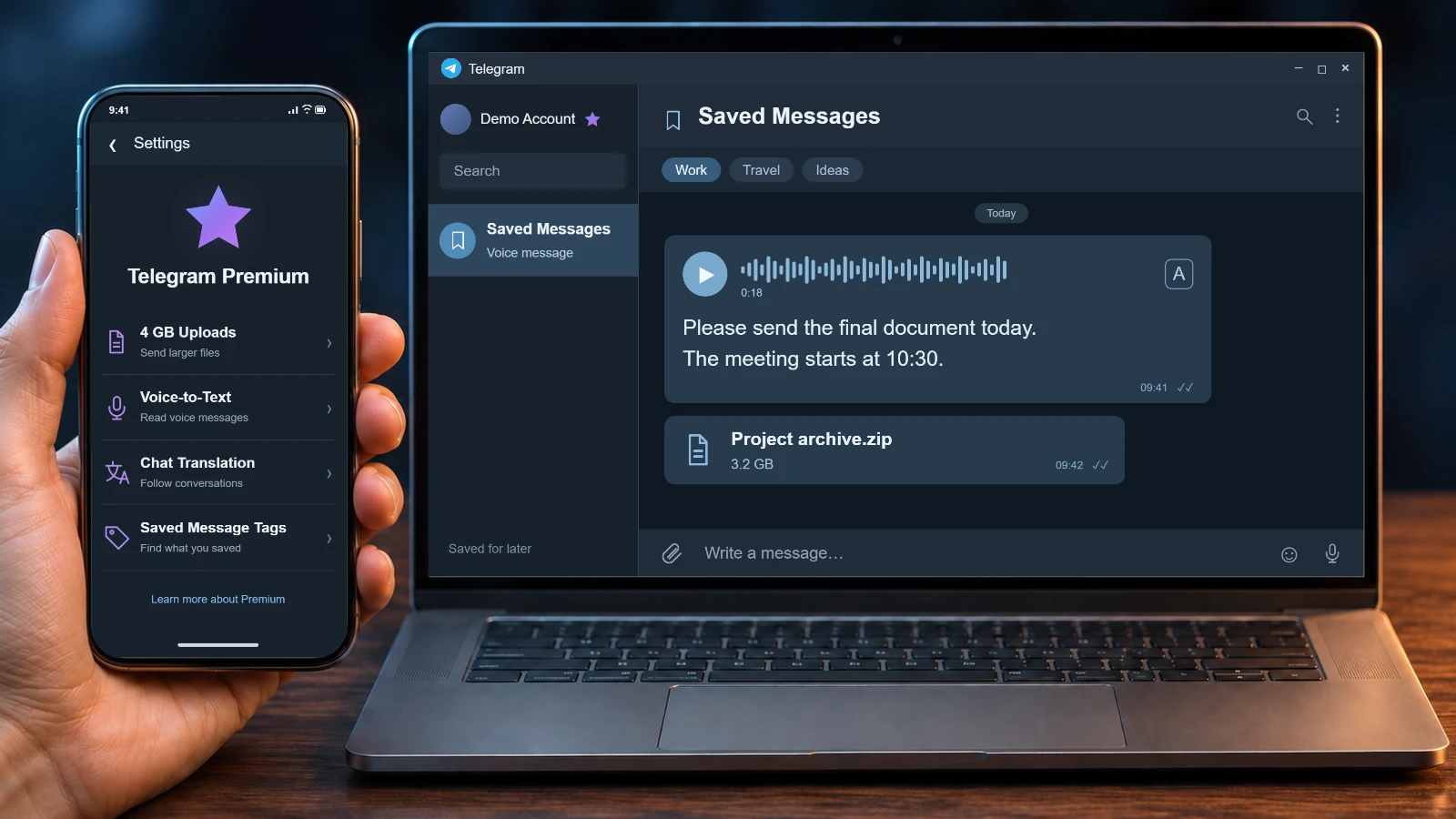
For example, a video editor can send a 3.2 GB draft as one attachment with Premium. The client can receive it without subscribing, as in the sample file workflow illustrated below.
Anything above 4 GB still needs a smaller export or another transfer method. Agree on the version the recipient needs: an original project file and a short review copy serve different purposes.
Premium removes Telegram’s download speed cap from the subscribed account. Your connection and hardware still affect the transfer, so allow for those when planning a delivery.
Saved Messages keeps an attachment within reach on connected devices, with storage available to free users too. Evaluate Premium by the files you send and download, rather than the total size of your message history.
Make a busy account easier to navigate
A consultant could keep active client chats apart from professional reading and personal groups. Premium raises the folder allowance and lets you choose which folder opens first, so the app can open on current work.
Name folders for the way you look for conversations: by project, customer or activity. Reserve pinned chats for conversations you return to throughout the day.
Saved Messages tags
Premium tags filter saved material by labels based on emoji, with optional names. For example, label an article “Read later” and a brief “Client work”, then choose the relevant tag when searching Saved Messages. A saved item can have more than one tag.
A few labels can separate reference material from items that need action. Saving messages and files remains free; tags help you retrieve them.
Automatic archiving and muting of new chats can reduce interruptions. If you enable it, include the archive in your routine: a useful new inquiry can match those settings too.
Turn voice notes into text and translate an ongoing chat
Read an incoming message when listening is inconvenient
Tap the transcription control beside a voice or video message to read it. In a quiet room, for example, you can check an incoming request before deciding whether to step outside and listen.
Free accounts have a limited allowance; Premium removes that request quota. Try it on your usual audio first. Unclear speech and specialist vocabulary can produce errors, so listen to the original when a name, number or commitment matters.
Follow the conversation without translating each message
Premium adds a translation bar at the top of chats, groups and channels in other languages. Choose the language there to follow a discussion without translating each short reply separately.
Individual-message translation is available without Premium. If an agreement depends on a particular phrase, compare the original or ask the other person to confirm the point, especially for prices and deadlines.
Tools for shared work and longer posts
Checklists that participants can update
A Premium subscriber can create a checklist from the attachment menu and send it to a group, a private chat or Saved Messages. The creator controls whether other participants can mark tasks complete or add items.
For an event, list jobs such as confirming the venue and sending joining instructions. Give editing permission to the people doing the work. Write each item so they can tell when it is complete.
A rich-text editor for instructions and announcements
The editor introduced in July 2026 is currently a Premium feature. It supports headings, tables, lists and images or video within a message, with up to 32,768 characters.
An instructor can put a session outline and an exercise table into one post. Keep headings descriptive and tables narrow enough to read on a phone, so readers can find the relevant part.
Business replies and availability
Telegram Business includes opening hours, a location, greeting and away messages, and quick replies. Quick replies insert prepared messages in private chats, not groups. A small studio could keep a standard explanation of booking requirements ready, then adapt the reply to the inquiry.
Set greeting and away-message recipients so work messages do not go to friends. Update the saved wording when your hours or offer change.
Stories, profile styles and privacy settings
Premium adds more control over Stories, including custom expiration choices, longer captions and access to the viewer history after a story expires. For an event announcement, the duration can match how long the information remains useful. Choose the intended audience for each story before publishing.
Emoji statuses, extra reactions and profile customization can make frequent use more enjoyable. Treat them as personal preferences and judge the designs you would actually use.
What Stealth Mode does
Stealth Mode removes your story views from the previous five minutes and hides new views for the next 25 minutes. Replying or reacting to a story still places you in its viewer list. The feature concerns Stories, not every activity across Telegram.
Last-seen and read-time controls are separate. With Premium, you can hide your own times while seeing those shared with you; times another user has hidden stay hidden. Check the setting for the particular activity you care about.
How much is Telegram Premium? Check the offer for your account
Open Telegram Premium in the settings of the intended account. Compare the total charge, currency and subscription period. An annual offer can show a monthly equivalent while collecting a full year’s payment at once. Choose a commitment that fits how long you expect to use the features.
Step 1. Read the checkout total
Use the amount shown for your account and payment route. Country, store fees and taxes can affect it. If the currency differs from your usual one, include your payment method’s conversion cost when comparing offers.
Step 2. Identify the renewal
Look for the next billing date, whether renewal is automatic and which provider takes the payment. Keep the purchase details so you can find the correct subscription later.
Step 3. Use an available purchase route
Official options include the App Store, Google Play and @PremiumBot. Bot access depends on the country and app; it is available in supported direct-download clients. Check what is offered in your own app instead of assuming every route is available everywhere.
Use the first paid period to evaluate your chosen feature. A yearly discount is useful only if the longer commitment suits your plans.
How to cancel Telegram Premium
Manage an Apple or Google purchase through that store’s subscriptions settings. For @PremiumBot, Telegram lists the /stop command. Removing the app does not cancel a subscription.
Canceling renewal leaves the current paid period running until its end. Check the recorded end date after canceling, especially if you only intended to try one month. A request for a refund is a separate matter governed by the payment provider’s terms.
What changes when Premium ends
Your ordinary conversations remain, while the account returns to free limits. If extra folders and pins have become part of your work setup, organize the important items before the subscription ends.
- The first ten folders stay available; additional folders become locked. Put essential folders near the start before expiry.
- Existing channel memberships remain. New additions are restricted when you are above the free limit.
- The first five main-list pins remain, while additional chats become unpinned. The conversations themselves are not deleted.
Some limits apply even during a paid subscription. Premium hides Telegram’s official sponsored messages, while promotions posted by channel administrators remain part of the channel. Paying also gives no exemption from Telegram’s rules or account restrictions.
A Premium badge does not verify someone’s identity. Keep login codes and account passwords private, including when someone offers to arrange a subscription.
If you encountered a payment request while signing in, read the guide to Telegram’s SMS Fee prompt. A charge connected to receiving a login code needs a different explanation from choosing extra features for an account you already use.
An existing subscription, a gift or a separate account
Use your existing account when you want Premium in conversations already attached to it. The subscription follows that account across connected devices. Check the selected account before paying if your app contains both work and personal accounts.
To send a Premium gift, open the recipient’s profile and find Gift Premium in its menu. Confirm the intended account if they have more than one, then read the offered term. Buying another account does not move the gift or an active subscription onto the account you already use.
Ordering a new Premium account from DragonSIM
If you need a distinct account for a project, see DragonSIM’s made-to-order Premium account service. The order creates a new account with Premium active. It does not upgrade your personal profile or combine its conversations with the new account.
Specify the account country, quantity and one of the service’s offered Premium terms. Include the delivery format if you need a particular one, then agree availability, price and preparation time before payment. This is an account order, so a subscription price shown in your own Telegram app is not a quote for the service.
This suits a project whose conversations you want to keep separate. For transcripts of voice notes already arriving in your personal chats, subscribe on your personal account.
Plan a separate account with Premium
Review the DragonSIM service and specify the country, quantity and available term you need. The order creates new accounts with active Premium; it does not activate a subscription on your existing profile. Confirm the order details before paying.
Common questions
Is Telegram Premium worth it for everyday use?
It is most useful when a particular feature meets a recurring need: large uploads, frequent transcripts, whole-chat translation or organized work. Stories and profile extras can also be worthwhile for personal enjoyment. Compare those uses with the actual price offered to you.
Can someone with free Telegram download my 4 GB file?
Yes. Premium is needed to upload that size of file, but the recipient does not need a subscription. Their connection and device still affect how quickly they can download it.
Does Premium work on both my computer and phone?
Yes, when they use the same subscribed account. A separate payment for each device is not required. Support for a particular new feature can differ between clients, so check the version on the device you plan to use.
How do I gift Telegram Premium to the right account?
Open the recipient’s profile and find Gift Premium in the menu. Check the recipient and the offered term before paying, particularly if the person has both personal and work accounts. The gift applies to the account you choose.
Will Stealth Mode hide me if I reply to a Story?
No. A reply or reaction makes you visible in the story’s viewer list even with Stealth Mode enabled. The mode hides story views within its time window, not every interaction in Telegram.
Where can I see the monthly Telegram Premium price?
Open Telegram Premium in the intended account’s settings and check an available monthly offer. Compare the total, currency and renewal terms. A monthly equivalent shown for an annual plan does not mean you are paying for one month at a time.
What happens to Premium if I change my phone number?
Changing the number inside the same account keeps the subscription. Moving to a different account does not transfer it. Keep this distinction in mind before setting up another account for work.
How do I cancel Telegram Premium without another charge?
Stop renewal through the provider used for the purchase: the Apple or Google subscriptions settings, or /stop in @PremiumBot. Uninstalling Telegram does not cancel payment. Your paid period continues until its end date.
Are Telegram Stars and paid channels included?
They are separate purchases. Stars are used for payments inside Telegram, and creators can charge a recurring Stars payment for access to a channel. Premium alone does not pay for those goods or channel memberships.
Can DragonSIM activate Premium on my current account?
The DragonSIM service creates a new separate account with active Premium under an agreed order. For paid features on your current account, subscribe on that account or receive a Premium gift addressed to it.
Official feature and subscription guides
- Premium subscriptions, devices, cancellation and limitstelegram.org/faq_premium
- File uploads, increased limits and chat organizationtelegram.org/blog
- Saved Messages tags and last-seen privacytelegram.org/blog
- Stories controls and Stealth Modetelegram.org/tour
- The rich-text editor for longer poststelegram.org/blog